What the copier does
A Trade Copier reproduces supported trades from a source account on connected receiver accounts. Cipher Trade Copier follows this source-to-receiver workflow, applying each receiver’s configured sizing and execution settings. The supported platform, account limits and available trade operations are confirmed for the supplied build. Copying reduces manual entry work but does not remove execution or trading risk.
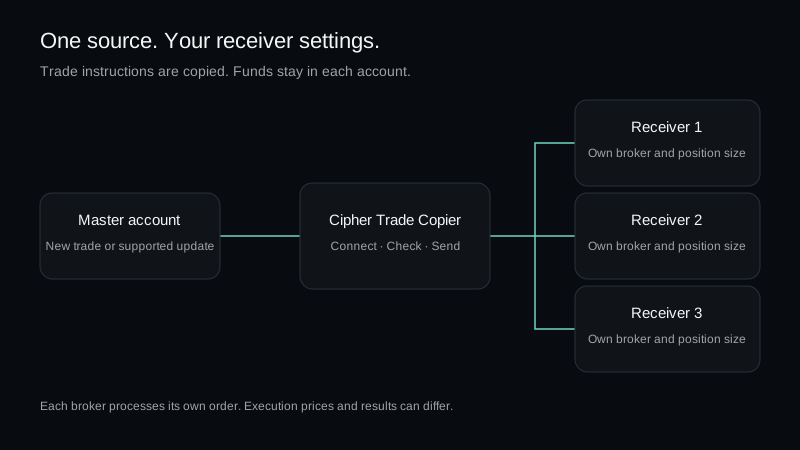
Setup sequence
| Step | Check |
|---|---|
| 1 | Confirm the supported platform, broker and source/receiver accounts. |
| 2 | Install or connect the supplied sender and receiver components. |
| 3 | Choose the supported sizing method separately for each receiver. |
| 4 | Verify symbol mapping, stop loss and take profit behavior. |
| 5 | Test a complete source trade and its receiver orders before enabling live copying. |
Risk and execution controls
- Use a maximum lot size.
- Confirm whether multiple simultaneous trades are allowed.
- Check what happens when the terminal or internet connection stops.
- Do not copy to an account whose symbol or contract settings have not been verified.
- Compare the copied order with the source during testing.
Why copied results can differ
Broker price feeds, symbol suffixes, spread, slippage, minimum distance rules, connection delay and account permissions can change or reject an order. A copier cannot guarantee identical fills or results across accounts.
Information support may request
- Account platform and version
- Broker name and account type
- Affected symbol
- Copier status or error message
- Time of the signal or attempted order
Hide account numbers, balances and login credentials before sharing screenshots.
Configure your receivers
Follow Copier settings and troubleshooting for source connections, position sizing, symbol mapping and a complete demo test. Exact installation screens and control names will be added with the released build.