Choose the setup source
TP/SL Levels can follow the main Cipher signal, any enabled intelligence-layer flip, a single named layer or the Custom Alert Creator. When an enabled overlay starts a setup, the entry label identifies its source.
| Source | New setup begins when |
|---|---|
| Signals | The selected Confirmation or Contrarian signal appears. |
| Enabled Overlays | Any enabled intelligence layer changes direction. |
| Named tool | Smart Trail, Reversal Zones, Trend Catcher, Trend Tracer or Neo Cloud triggers. |
| Custom Alert Creator | The configured multi-condition sequence completes. |
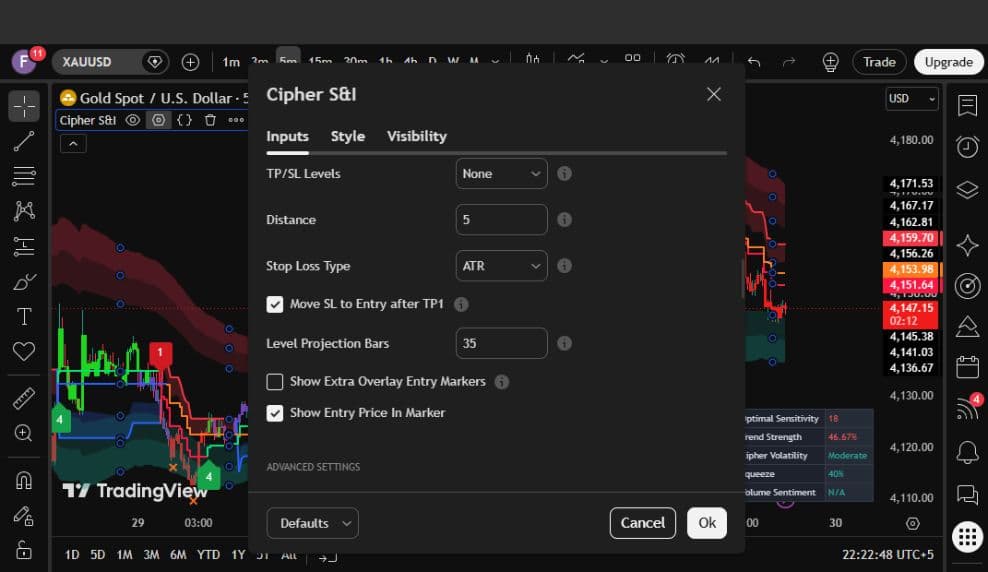
Distance and stop type
Distance controls how far ATR-based levels sit from entry; a reference value of 5 represents one ATR of risk in the current build. ATR uses a volatility-based fixed stop, while Swing places the stop beyond the latest 10-bar swing high or low.
- TP1 is positioned at 1R.
- TP2 is positioned at 2R.
- TP3 is positioned at 3R.
- Move SL to Entry after TP1 protects the remaining targets at breakeven.
Display controls
Level Projection Bars controls how far the lines extend to the right. Show Extra Overlay Entry Markers can mark every enabled intelligence flip, while Show Entry Price In Marker keeps the exact entry visible on the setup marker.